Software Review
GoHighLevel Review for Agencies and Local Lead Generation
GoHighLevel, officially branded as HighLevel, is an agency-focused CRM and marketing automation platform that combines funnels, forms, calendars, pipelines, conversations, SMS/email follow-up, and client sub-accounts in one place. For local lead generation agencies, the real question is not whether GoHighLevel has enough features. It has plenty. The more important question is whether the platform is worth the setup time, monthly cost, and learning curve for the way you plan to generate and manage leads.
This GoHighLevel review combines a hands-on HighLevel walkthrough using test data, official HighLevel pricing and billing information, third-party review platform research, and editorial analysis. Pricing, features, limits, add-ons, usage-based services, and plan details can change, so always check the official website before buying.
Logo shown for product identification only. Lead Stack Guide is not owned by or officially endorsed by HighLevel.
Review Summary
GoHighLevel is best suited for agencies, freelancers, consultants, and local marketers who want to manage lead capture, CRM, appointment booking, and email/SMS follow-up from one platform. It is probably too much if you only need a simple contact list, a basic form, or a lightweight sales pipeline. The platform makes the most sense when you will actually use multiple features together, especially to capture leads, follow up quickly, book appointments, and track opportunities through a client workflow.
Is GoHighLevel Right for You?
- You run a small agency or local lead generation business
- You manage leads for local business clients
- You only need a simple lead capture form
- You only need a basic visual sales pipeline
What GoHighLevel does
GoHighLevel is built around the idea of giving agencies and marketers one platform to capture, nurture, book, and close leads. In practical terms, that means combining landing pages, forms, surveys, calendars, CRM records, pipelines, conversations, and automated follow-up workflows.
For a local lead generation workflow, a typical use case might look like this: a prospect fills out a landing page form, gets added to the CRM, receives an automated follow-up, books a call, and moves through a sales pipeline. GoHighLevel tries to keep that process inside one system instead of spreading it across many separate tools.
The agency angle is what separates GoHighLevel from a normal small-business CRM. Sub-accounts, client workflows, white-label options, rebilling options, and reusable campaign systems make it more useful for agencies that manage marketing and follow-up for multiple local businesses.
The tradeoff is complexity. GoHighLevel can be powerful, but beginners may need time to understand workflows, pipelines, calendars, sub-accounts, settings, and usage-based costs. It is strongest when you are serious about building repeatable systems, not when you only need one simple feature.
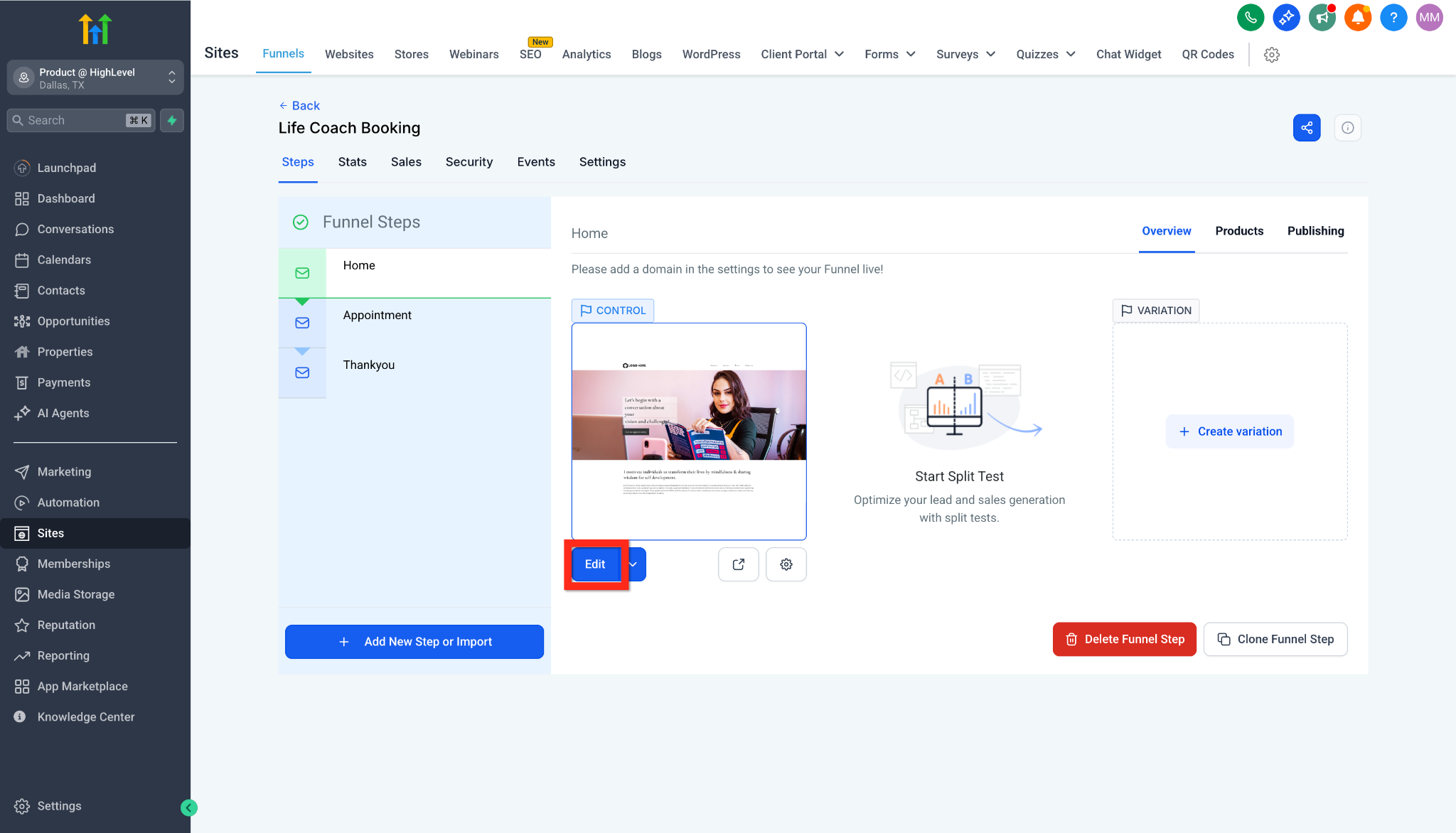
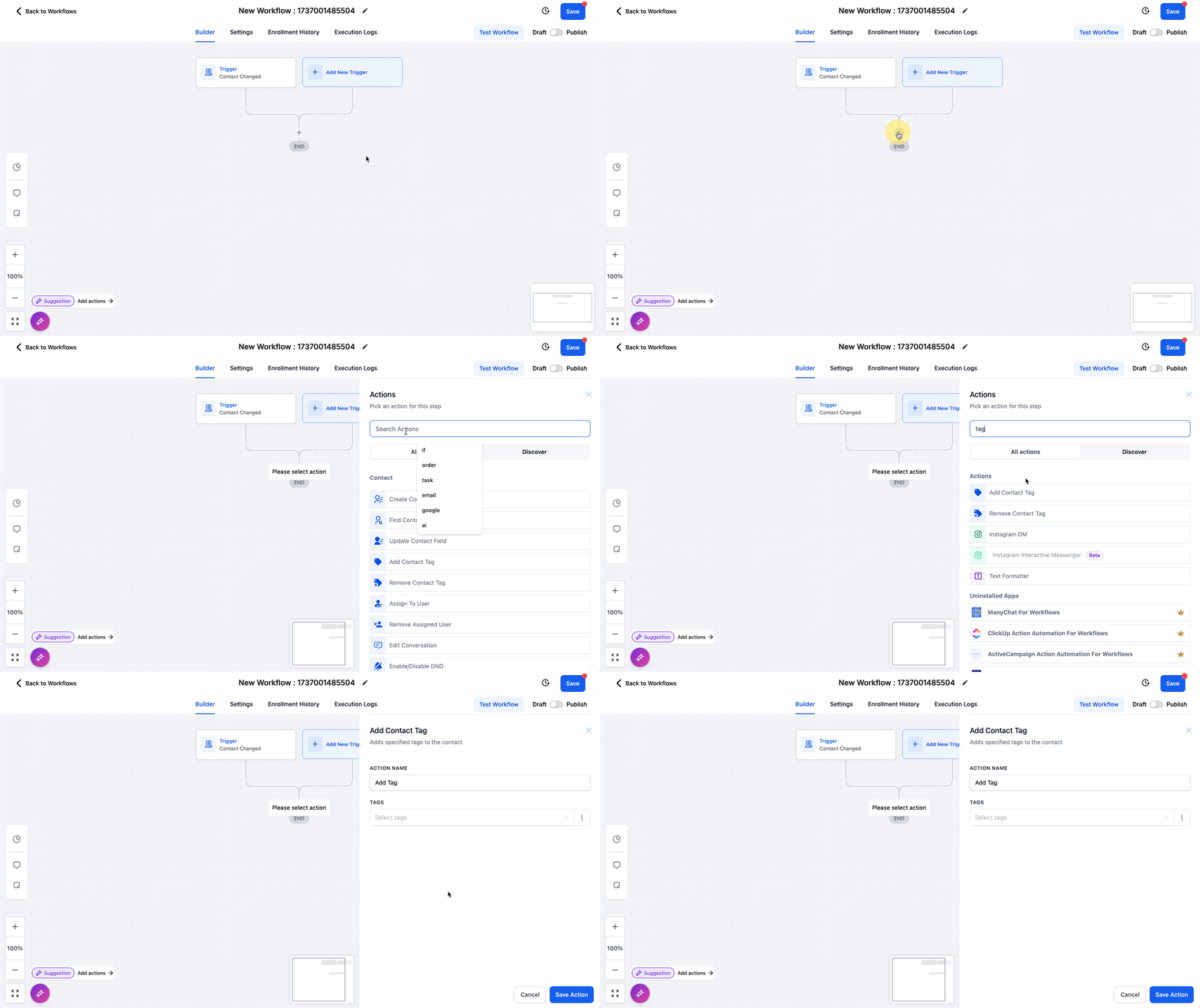
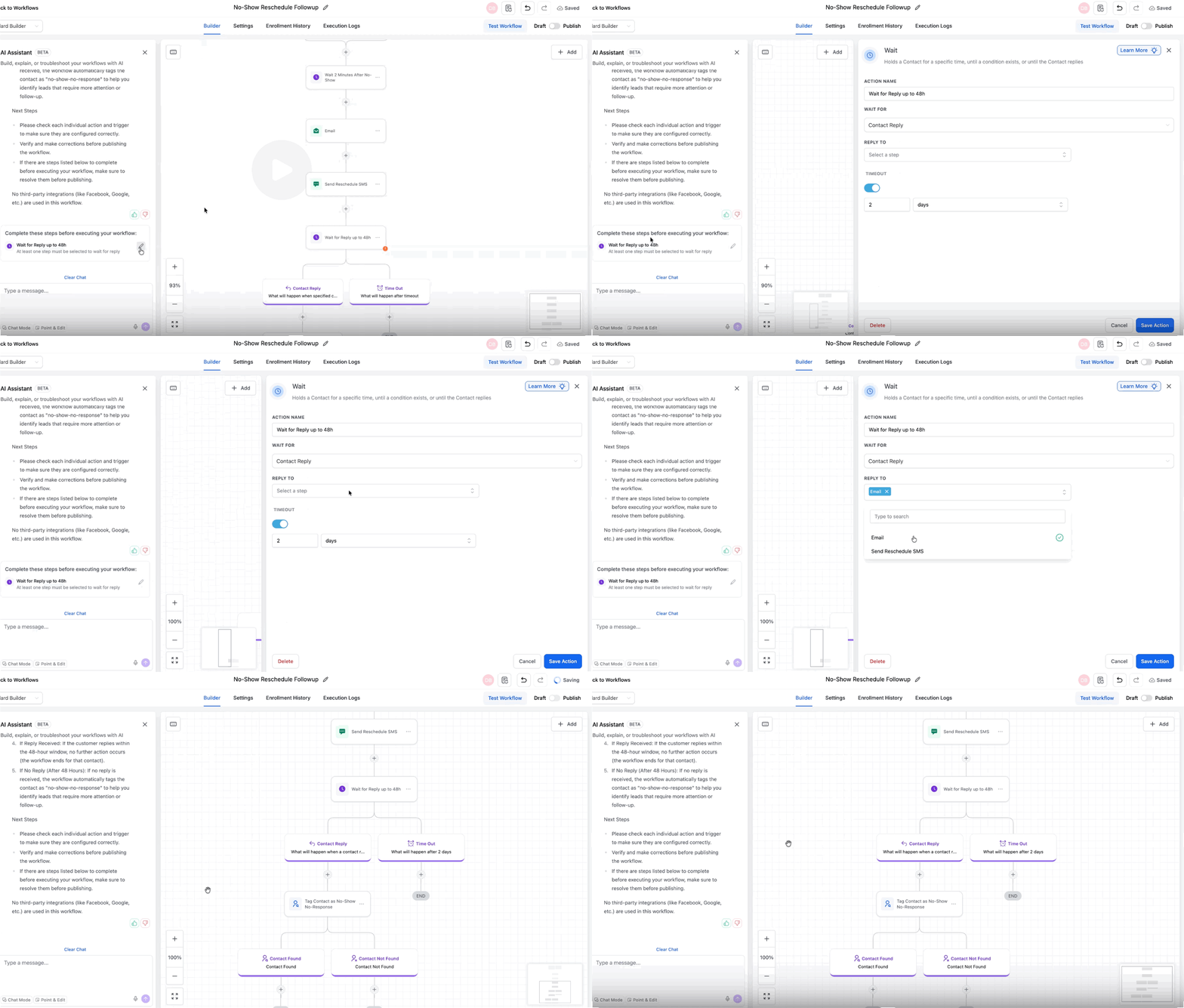
A look inside GoHighLevel
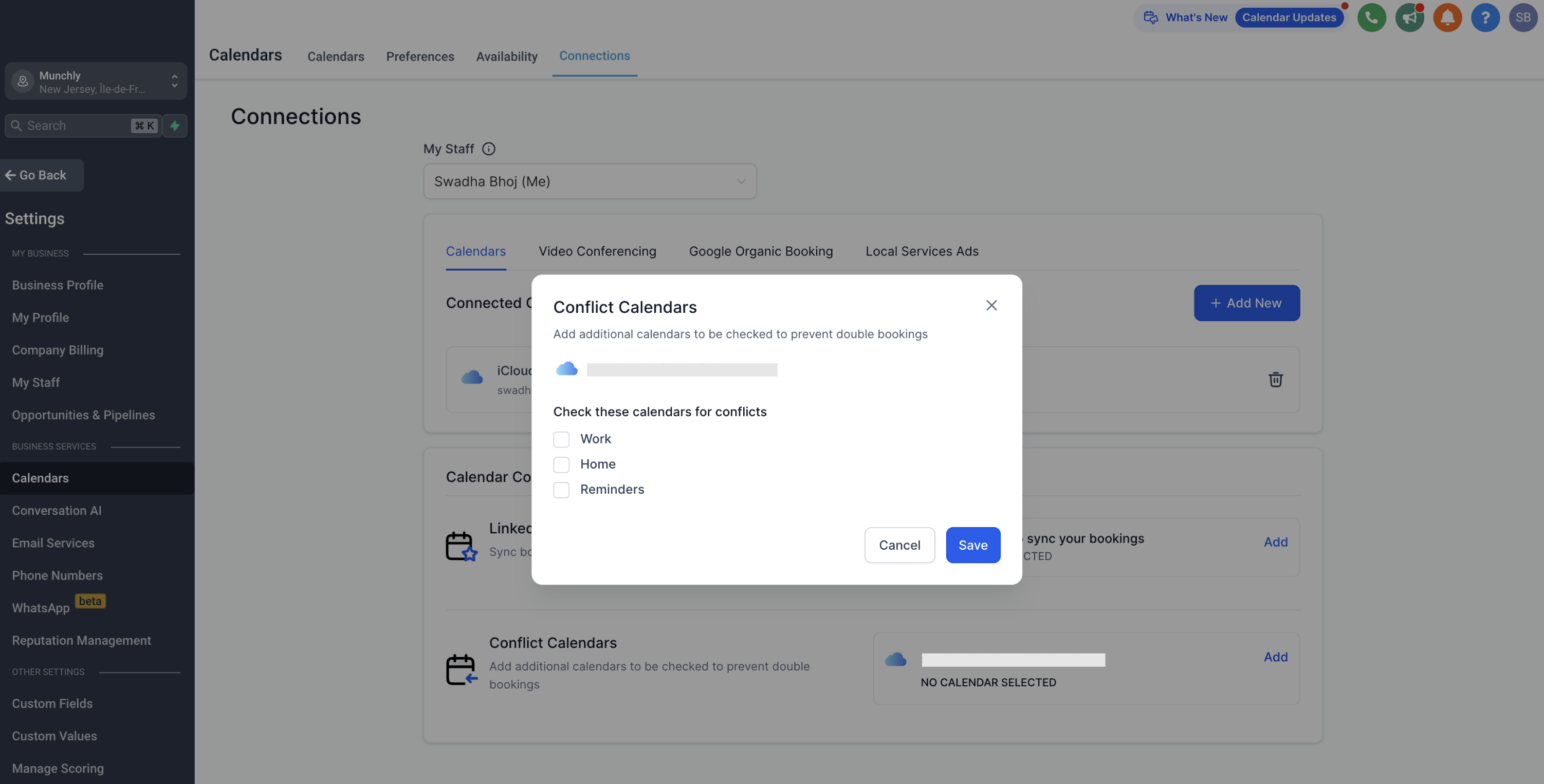
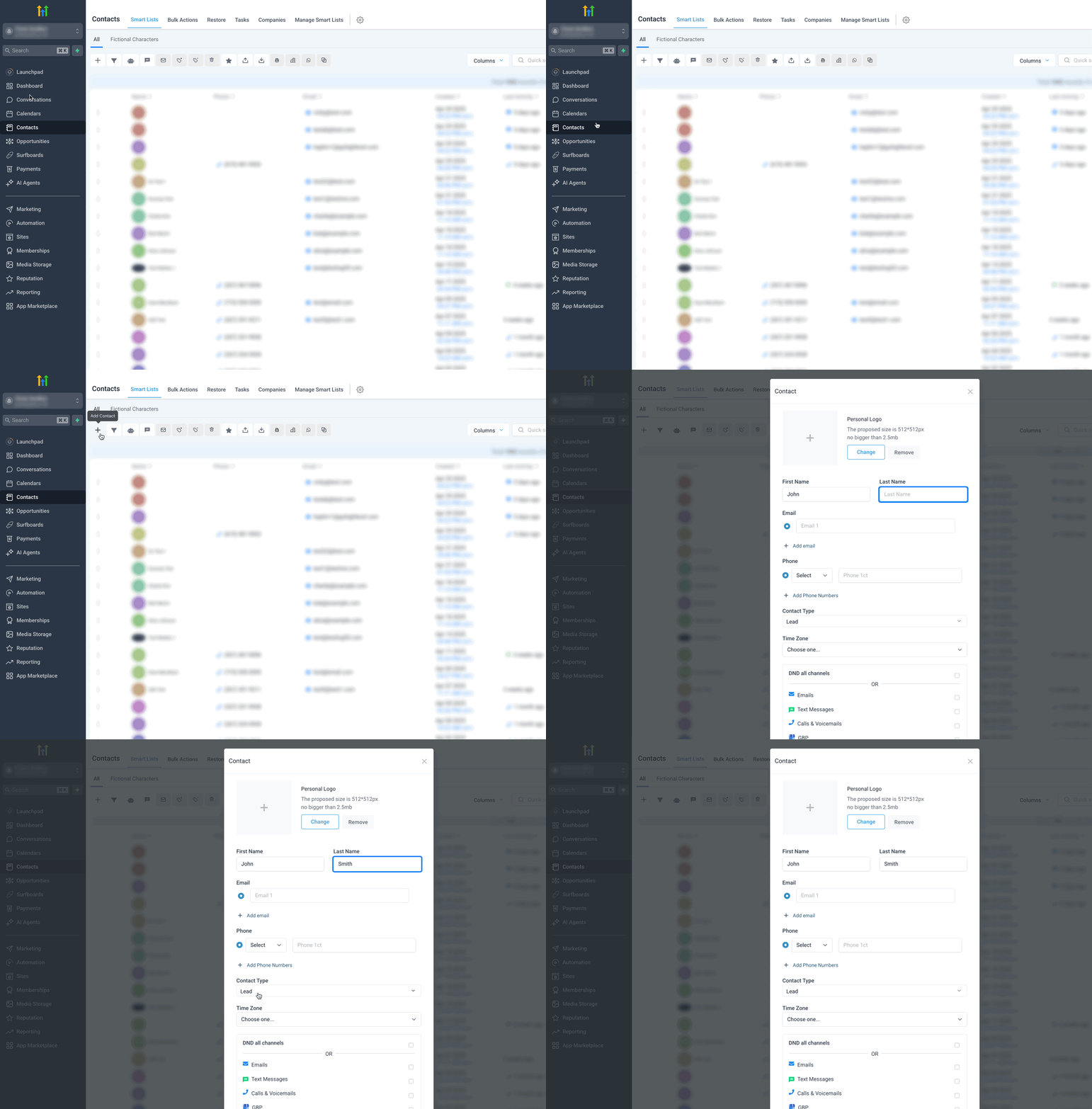
Pricing and value
Pricing snapshot
Pricing last checked: July 2026Pricing can change. Check the official HighLevel pricing page and billing documentation for current GoHighLevel plans, sub-account limits, usage-based charges, add-ons, rebilling rules, and billing terms.
GoHighLevel’s public pricing currently shows Starter at $97/month, Unlimited at $297/month, and Agency Pro/SaaS Mode at $497/month. Starter is aimed at single business owners or new agencies and includes up to 3 sub-accounts. Unlimited is aimed at agencies that need unlimited sub-accounts. Agency Pro is more relevant for agencies that want SaaS Mode, automated account creation, and rebilling with markup.
HighLevel also currently offers a 14-day free trial, which gives agencies a chance to test GoHighLevel before committing to a paid plan. Use the trial to build one real workflow, such as form to CRM to pipeline to calendar to SMS/email follow-up, instead of trying to test every feature at once.
One important strength is that GoHighLevel’s plans currently include unlimited contacts and unlimited users. That can be valuable for agencies because you are not forced into per-user pricing as your team grows. The bigger pricing question is usually sub-accounts, usage-based services, add-ons, and whether you will actually use enough of the platform to justify the monthly fee.
For a small agency, the value depends on whether GoHighLevel replaces several tools you would otherwise pay for separately, such as a CRM, funnel builder, calendar tool, form builder, email/SMS follow-up system, conversation inbox, reputation tool, and automation platform. If you use those pieces together, HighLevel can make sense as an agency operating system.
The base subscription is not always the full cost. Agencies should also check usage-based charges and add-ons such as phone/SMS/MMS, email usage, AI features, WhatsApp, listings, HIPAA, dedicated IP, and other paid services. These costs may matter more as you add clients, sub-accounts, campaigns, and message volume.
If you only need one or two basic functions, GoHighLevel may be more platform than you need. A simple CRM, form tool, or booking tool may be cheaper and easier. HighLevel is easier to justify when you are building repeatable lead generation systems for clients, not just storing contacts.
Which GoHighLevel plan should you choose?
The right GoHighLevel plan depends less on the label and more on how many clients, sub-accounts, and agency workflows you actually need. Pricing and plan features can change, so check the official HighLevel pricing page before buying.
| Plan | Best for | Main thing to watch |
|---|---|---|
| Starter | Solo marketers, small businesses, or new agencies that only need a few sub-accounts. | May feel limited if you plan to manage many client accounts or scale agency operations quickly. |
| Unlimited | Growing agencies that need unlimited sub-accounts for client work. | Check current usage limits, add-ons, and whether your team will actually use the extra capacity. |
| Agency Pro | Agencies that want SaaS Mode, automated sub-account creation, rebilling features, and more advanced agency workflows. | Best suited for agencies with a clearer SaaS/client management strategy, not casual beginners. |
GoHighLevel pros and cons
Pros
- Combines CRM, funnels, forms, calendars, conversations, and automation in one platform
- Strong fit for agencies and local lead generation workflows
- Useful when you need automated follow-up after a lead submits a form or books a call
- Sub-account structure can make sense for agencies managing multiple clients
- Unlimited contacts and users can be valuable compared with per-seat tools
- Can reduce tool sprawl if you would otherwise pay for several separate apps
- Agency Pro/SaaS Mode can support rebilling and SaaS-style client workflows for more advanced agencies
Cons
- Can feel overwhelming for beginners
- Not the simplest choice if you only need a basic CRM, form builder, or booking link
- Setup quality matters; poor workflows can make the platform feel messy
- Support feedback is mixed across user-review platforms
- Agencies should check plan limits, sub-account needs, usage-based costs, add-ons, and rebilling rules
- Some users report bugs, missing features, or product changes that can affect workflows
- May be unnecessary for businesses that do not need automation, SMS/email follow-up, or agency workflows
Recommendation
Lead Stack Score: 4.2 / 5. GoHighLevel is worth considering if you are building agency-style lead generation systems and want CRM, funnels, appointment booking, conversations, automation, and follow-up tools in one platform. It is strongest when you use these features together, not when you only need one simple tool.
Lead Stack Score breakdown
This is our editorial score based on Lead Stack Guide’s software evaluation criteria.
GoHighLevel setup difficulty
GoHighLevel has a medium-to-high learning curve, especially for users who are new to agency CRM and automation systems. To get real value from the platform, you need to understand contacts, pipelines, calendars, funnels, forms, workflows, conversations, sub-accounts, and client settings.
This does not mean GoHighLevel is only for technical users. Many useful workflows can be built without code. But setup quality matters. A simple, focused setup can be valuable, while a poorly planned setup can quickly feel cluttered.
This is one of the most common patterns across user reviews: people like the all-in-one feature set and agency workflow potential, but some users find the platform overwhelming at first. GoHighLevel is best approached as a system you build, not a tool you casually turn on.
Key features
Lead capture
- Landing pages and funnel pages
- Forms and surveys for lead intake
- Calendar booking paths for appointment-based offers
- Useful for local service campaigns and consultation offers
CRM and pipeline
- Contact records for captured leads
- Pipeline stages for tracking opportunities
- Conversation history and follow-up context
- Useful for agencies managing leads for clients
Automation and follow-up
- Email and SMS follow-up workflows
- Automated reminders and nurture sequences
- Workflow triggers based on lead actions
- Helpful for reducing manual follow-up gaps
Agency and client workflows
- Sub-accounts for managing client work
- White-label and agency-oriented features on higher plans
- Client campaign systems in one platform
- Useful for agencies that want fewer separate tools
Where GoHighLevel can replace separate tools
GoHighLevel’s main value is not that it has a CRM, funnels, calendars, forms, and automation as separate features. The value is that these pieces can work together in one lead generation workflow. For agencies and local marketers, that can reduce the need to connect several separate tools manually.
Lead capture pages and forms
GoHighLevel can help you build the front end of a campaign: landing pages, forms, surveys, and funnel steps where a prospect first becomes a lead.
CRM and pipeline tracking
Once a lead comes in, GoHighLevel can store the contact, track the opportunity, and move the lead through pipeline stages such as new lead, booked appointment, estimate sent, or closed client.
Calendar booking
GoHighLevel can connect lead capture to appointment booking, which is especially useful for local service businesses, consultations, estimates, demos, and sales calls.
Email and SMS follow-up
GoHighLevel can automate reminders, nurture messages, and follow-up sequences after someone submits a form or books an appointment. This is where the platform can be stronger than using a landing page tool and CRM separately.
Conversation management
GoHighLevel can keep lead communication in one place, making it easier to see past replies, missed messages, and follow-up context instead of jumping between email, SMS, and separate inboxes.
Review and reputation workflows
For local business clients, GoHighLevel can also support review-request and reputation workflows after a customer interaction, which can matter for agencies serving appointment-based or service-based businesses.
This replacement value only matters if you actually connect the pieces. If your workflow is just one form, one spreadsheet, or one simple pipeline, GoHighLevel may be more platform than you need.
GoHighLevel vs alternatives
- Choose GoHighLevel if you need agency CRM, funnels, calendars, SMS/email follow-up, and client workflows in one place.
- Choose HubSpot if you want a polished CRM-first customer platform for contacts, sales pipelines, marketing, service, reporting, and long-term customer data management.
- Read GoHighLevel vs HubSpot if you are comparing HighLevel against HubSpot for agency workflows, CRM, pricing, automation, reporting, and local lead generation fit.
- Choose Pipedrive if you mainly need simple sales pipeline tracking instead of a full agency operating system.
- GoHighLevel vs Pipedrive comparison to see the agency workflow vs simple sales pipeline difference if your shortlist is GoHighLevel vs Pipedrive.
- Read the agency guide if you are still deciding whether GoHighLevel is worth the monthly cost for agency or local lead generation work.
GoHighLevel is strongest when you want an agency-style lead generation system with funnels, calendars, CRM, SMS/email follow-up, and client workflows together. If you mainly need a polished CRM-first customer platform, a simpler sales pipeline, or a deeper buyer guide before choosing, one of these pages may be a better next step.
| Alternative | Best for | Main tradeoff | Comparison |
|---|---|---|---|
| HubSpot | CRM-first sales, marketing, service, and customer data management | More polished as a general CRM platform, but less agency-focused for local lead generation, client sub-accounts, funnels, and SMS-first follow-up workflows | View → |
| Pipedrive | Simple sales pipeline management | Less all-in-one for agency funnels, calendars, SMS/email follow-up, and client workflow automation | View → |
GoHighLevel FAQ
Is GoHighLevel good for beginners?
GoHighLevel can work for beginners who are serious about building agency-style systems, but it may feel overwhelming if you only need a simple form, landing page, booking link, or basic CRM. Beginners should start with one focused workflow before trying to use every feature.
Is GoHighLevel good for local lead generation?
Yes, GoHighLevel can be a strong fit for local lead generation because it combines funnels, forms, calendars, CRM pipelines, conversations, and automated email/SMS follow-up in one platform. It is especially useful when the goal is to capture leads, respond quickly, book appointments, and track opportunities.
How much does GoHighLevel cost?
GoHighLevel currently lists Starter at $97/month, Unlimited at $297/month, and Agency Pro at $497/month. The base subscription is not always the full cost because usage-based charges and add-ons may apply for phone, SMS, MMS, email usage, AI features, WhatsApp, dedicated IPs, listings, HIPAA, white-label apps, and other services. Always check the official HighLevel pricing page before buying.
Which GoHighLevel plan should agencies choose?
New agencies or solo marketers may start with Starter if they only need a few sub-accounts. Agencies managing several clients should usually compare Unlimited because it includes unlimited sub-accounts. Agency Pro is mainly for agencies that want SaaS Mode, automated account creation, and rebilling with markup.
Is GoHighLevel better than HubSpot?
GoHighLevel may be better for agency and local lead generation workflows because it is built around funnels, calendars, SMS/email follow-up, sub-accounts, and client campaign management. HubSpot may be better if you want a more polished general CRM and broader customer platform for sales, marketing, service, and reporting.
Is GoHighLevel better than Pipedrive?
GoHighLevel is more all-in-one for funnels, calendars, automation, conversations, and agency workflows. Pipedrive is usually simpler if your main need is visual sales pipeline tracking.
Is GoHighLevel worth $97/month?
GoHighLevel may be worth $97/month if it replaces several tools you actually use, such as a CRM, funnel builder, form builder, calendar tool, conversation inbox, and follow-up automation system. If you only need a basic CRM or lead form, $97/month may be more than necessary.
Does GoHighLevel have hidden costs?
GoHighLevel has a monthly subscription, but agencies should also check usage-based charges and add-ons for services such as phone/SMS/MMS, email usage, AI features, WhatsApp, listings, HIPAA, dedicated IP, and other paid services. These costs are not necessarily hidden, but they are easy to overlook if you only compare the base subscription price. The real cost depends on your clients, message volume, sub-accounts, and add-ons.
What is GoHighLevel best at?
GoHighLevel is best at connecting lead capture, appointment booking, CRM pipelines, conversations, and automated follow-up into one agency-style workflow. Its value is strongest when those features work together.
Is GoHighLevel only for agencies?
No. Small businesses, consultants, freelancers, and local marketers can also use GoHighLevel. However, its strongest fit is usually agencies and marketers that need lead capture, booking, CRM, SMS/email follow-up, client workflows, sub-accounts, and repeatable campaign systems.
Conclusion
Should you consider GoHighLevel?
Lead Stack Score: 4.2 / 5. GoHighLevel is worth considering if you are building agency-style lead generation systems and want CRM, funnels, appointment booking, conversations, automation, and follow-up tools in one platform. It is strongest when you use these features together, not when you only need one simple tool.
Choose GoHighLevel if
- You want CRM, funnels, calendars, conversations, and automation in one platform.
- You are building local lead generation or agency workflows.
- You manage, or plan to manage, multiple clients or sub-accounts.
- You want automated email/SMS follow-up after forms, bookings, and pipeline changes.
- You are ready to spend time setting up systems properly.
Choose another tool if
- You only need a simple sales pipeline.
- You only need a basic form, booking link, or landing page.
- You want the easiest possible beginner setup.
- You prefer a polished traditional CRM over an agency operating system.
- You are not ready to manage automations, workflows, usage-based costs, and client systems.
If GoHighLevel matches your workflow, check the latest pricing and trial details on the official website. If you are still deciding whether the monthly cost makes sense for agency work, read the GoHighLevel agency buyer guide first.
Sources checked
This GoHighLevel review uses public information from official HighLevel pages, HighLevel pricing and billing documentation, and third-party review platforms. Official sources are used for pricing, plan, trial, and billing facts. Third-party review platforms are used to identify recurring user praise and complaints. Last checked: July 2026.