Software Review
Pipedrive Review for Small Agencies and Lead Tracking
Pipedrive is a sales-focused CRM built around visual pipelines, deal tracking, contacts, activities, follow-up reminders, reporting, automation, and integrations. Its biggest appeal is clarity: you can see where every lead or deal sits, what needs to happen next, and where opportunities are getting stuck. For freelancers, consultants, small agencies, local marketers, and small sales teams, the real question is whether a focused sales CRM is enough — or whether you need a broader lead generation stack with funnels, booking, SMS/email follow-up, and client campaign workflows.
This Pipedrive review is based on public product research, official Pipedrive pages, third-party editorial reviews, verified user review platforms, and Lead Stack Guide editorial analysis. We do not claim hands-on testing for Pipedrive yet.

Logo shown for product identification only. Lead Stack Guide is not owned by or officially endorsed by Pipedrive.
Review Summary
Pipedrive is best for freelancers, consultants, small sales teams, and small businesses that want a clean visual CRM for tracking leads, deals, activities, follow-ups, and sales performance. It is easier to understand than broader customer platforms like HubSpot and less complex than agency-focused platforms like HighLevel. It is less ideal for local lead generation agencies that need funnels, client sub-accounts, SMS-first follow-up, reputation workflows, and repeatable campaign systems for multiple clients.
Is Pipedrive Right for You?
- You want a simple visual sales pipeline for tracking leads, deals, and next steps
- You sell through calls, meetings, demos, proposals, and repeated follow-up
- You need agency-style client sub-accounts for managing multiple local business clients
- Your main workflow depends on landing pages, funnels, calendars, SMS/email follow-up, reputation tools, and local campaign automation
What Pipedrive does
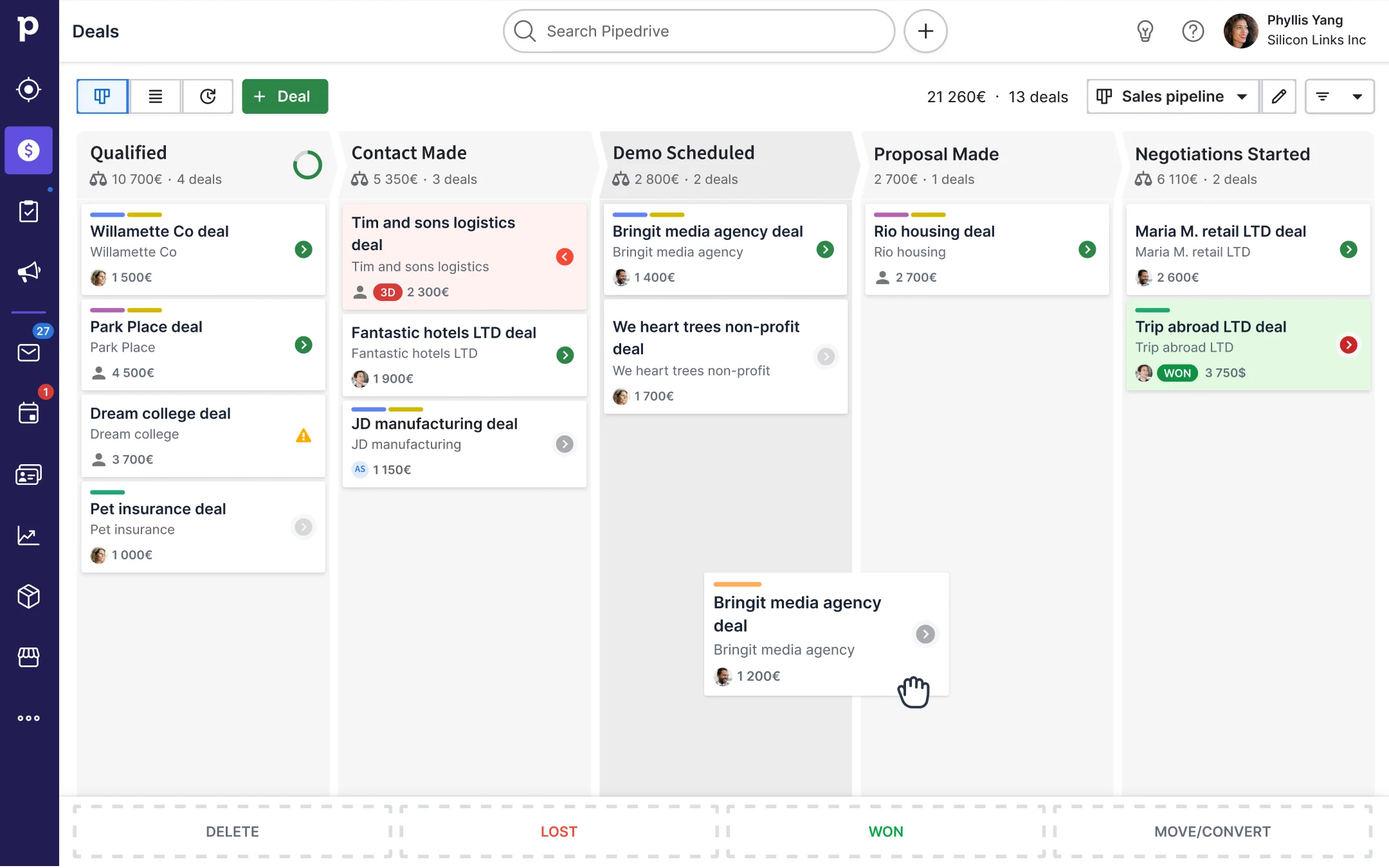
Pipedrive is a sales CRM designed to help teams manage leads, deals, contacts, organizations, activities, and sales pipelines. Its core strength is visual pipeline management: you can see where each opportunity stands, what the next step is, and which deals need attention.
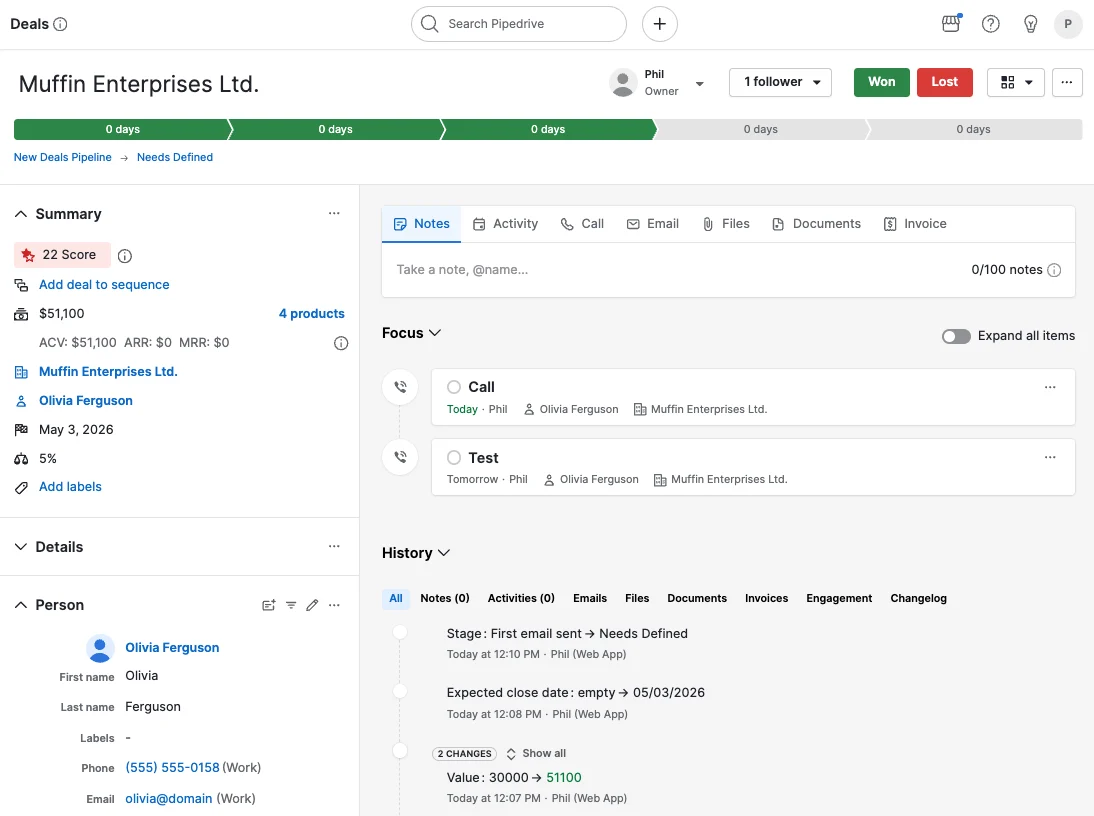
A typical workflow might look like this: a new lead enters Pipedrive, gets connected to a contact or organization, moves into a pipeline stage, receives a next activity, and is followed up through calls, emails, meetings, demos, proposals, negotiation, and close. That simple sales rhythm is where Pipedrive makes the most sense.
Depending on plan and setup, Pipedrive can also support email sync and tracking, workflow automation, sequences, meeting scheduling, forecasting, reporting, AI-assisted features, lead generation/routing, documents, projects, marketplace apps, and integrations. This makes it more useful than a spreadsheet while staying more focused than an all-in-one customer platform.
The tradeoff is scope. Pipedrive can track leads and deals well, but it is not primarily an agency operating system. Agencies that need landing pages, funnels, appointment booking, SMS/email sequences, reputation workflows, and separate client accounts may need HighLevel or a connected stack around Pipedrive.
A look inside Pipedrive
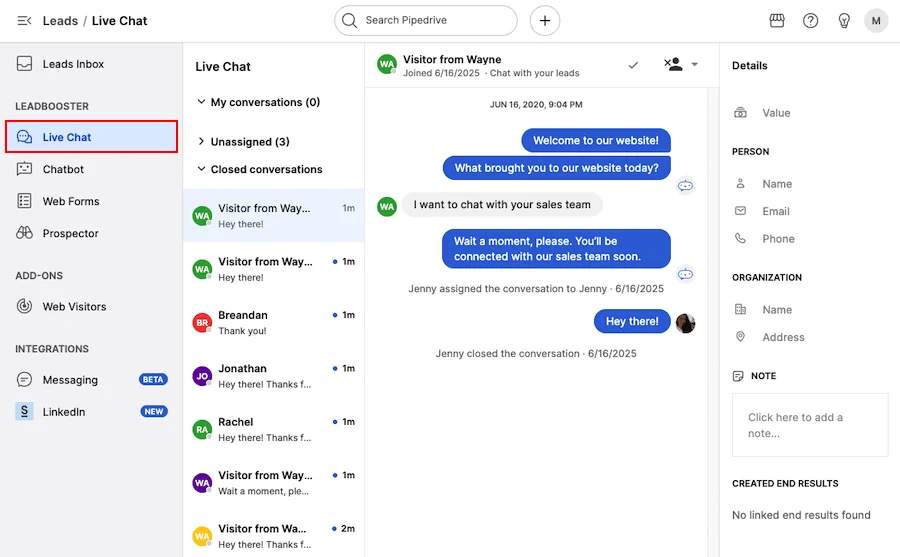
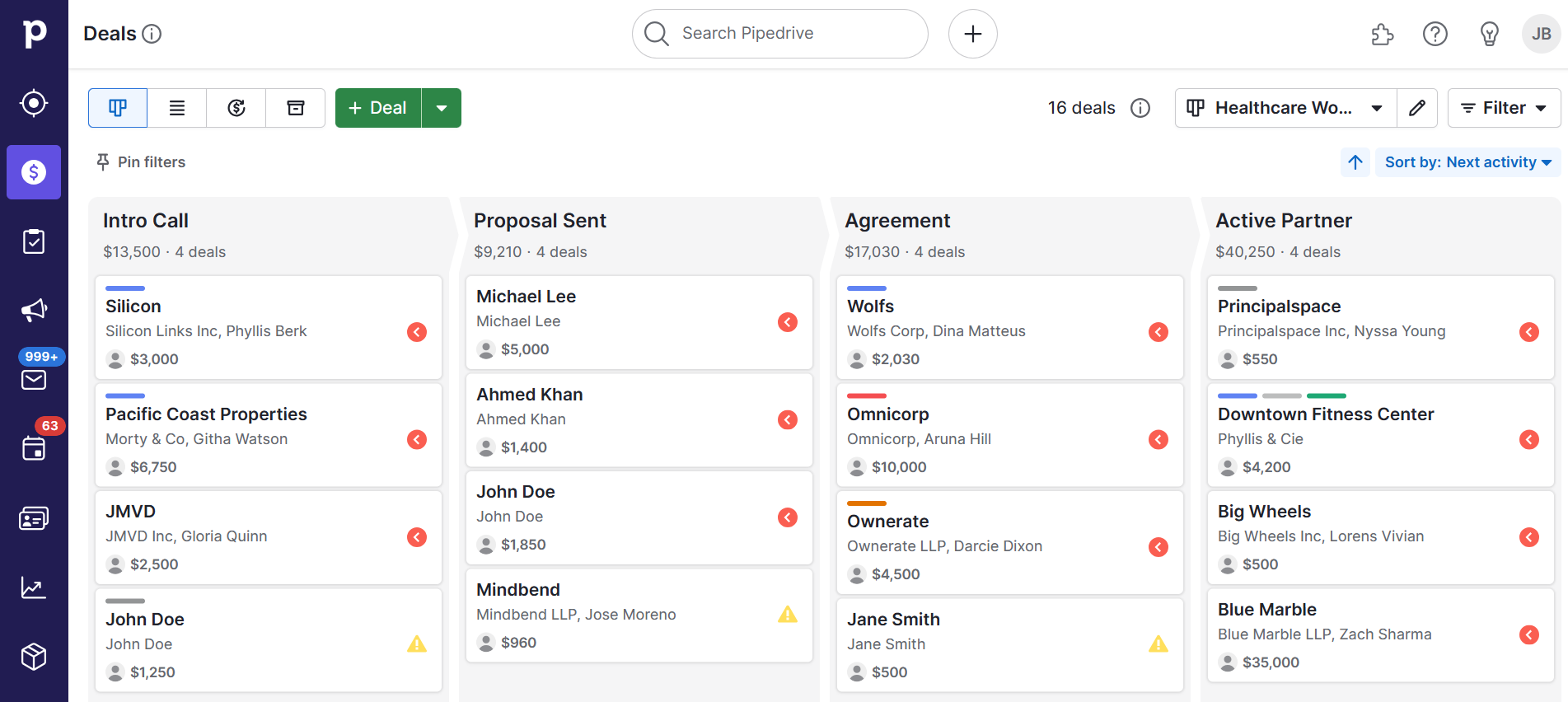
Pricing and value
Pricing snapshot
Pricing last checked: July 2026Pipedrive pricing can vary by region, currency, billing term, plan, seat count, add-ons, and included feature limits. Pipedrive introduced updated plan names in 2025, including Lite, Growth, Premium, and Ultimate. Always check Pipedrive’s official pricing page before buying.
Pipedrive is a paid sales CRM with pricing based mainly on plan level, user seats, billing term, regional currency, and optional add-ons. The official pricing page currently lists Lite, Growth, Premium, and Ultimate rather than the older Essential, Advanced, Professional, Power, and Enterprise naming. That matters because plan names and included features may differ from older reviews you find online.
For freelancers, consultants, and small sales teams, the pricing question is practical: will Pipedrive help you close enough deals to justify paying per user? If your sales process depends on tracking opportunities, assigning next activities, following up on time, and understanding pipeline health, the cost can be easier to justify than a broader platform full of features you may not use.
The value gets more complicated when you need more than the core CRM. Pipedrive can support lead capture, email marketing, documents, web visitor tracking, projects, and other workflows through included higher-tier features or paid add-ons depending on the plan. Before buying, calculate the total cost for your actual users, billing term, and add-ons — not just the entry plan price.
Compared with HighLevel, Pipedrive is not trying to be an agency funnel, calendar, SMS/email, reputation, and client workflow platform. Compared with HubSpot, it is not trying to be a full customer platform across sales, marketing, service, content, data, and operations. Its value is focus: it is strongest when the main job is sales pipeline management, and weaker when you need a complete lead generation and client delivery system.
Which Pipedrive plan should you choose?
Start by deciding how much you need beyond basic pipeline tracking. Pipedrive's current public plan names are Lite, Growth, Premium, and Ultimate, but pricing and included features can vary by region and change over time. Use the official pricing page as the final source before buying.
| Plan | Best for | Main thing to watch |
|---|---|---|
| Lite | Freelancers, consultants, and small teams that want a simple paid CRM for lead, deal, contact, calendar, activity, and pipeline tracking. | May feel limited if you need full email sync, automation, sequences, forecasting, meeting scheduling, or stronger team controls. |
| Growth | Small teams that want a more practical sales workflow with email sync/tracking, automations, follow-up sequences, forecasting, and meeting scheduling. | Likely the more realistic starting point if follow-up structure matters, but check limits and whether the included automations fit your process. |
| Premium | Teams that want fuller sales-cycle support, stronger lead routing/scoring, data enrichment, contracts, e-signatures, reporting, and customization controls. | Make sure the extra tools replace something you would otherwise buy separately; otherwise the higher per-user cost may not be necessary. |
| Ultimate | Larger or more mature sales teams that need stronger security, enrichment, sandbox testing, extended support, and more advanced controls. | Usually more than a freelancer, consultant, or early-stage local agency needs unless sales operations are already mature. |
Pros and cons
Pros
- Clear visual pipeline that is easy for small sales teams to understand
- Strong fit for deal tracking, activity tracking, reminders, and follow-up discipline
- Usually faster to launch than a broad CRM or customer platform
- Good option for freelancers, consultants, and small teams that sell through calls, meetings, demos, and proposals
- Useful reporting, forecasting, and pipeline visibility depending on plan and setup
- Large integration ecosystem makes it easier to connect Pipedrive to a wider sales stack
Cons
- No long-term free CRM plan listed on the current public pricing structure
- Not built around agency sub-accounts or multi-client local lead generation operations
- Less all-in-one for landing pages, funnels, calendars, SMS/email follow-up, and reputation workflows
- Advanced marketing automation and nurture workflows are not the core strength compared with dedicated automation tools
- Useful features, higher limits, add-ons, and support options may require higher-tier plans or extra cost
- Not as broad as HubSpot for customer platform, service, content, data, and cross-department reporting needs
Recommendation
Lead Stack Score: 4.0 / 5. Pipedrive is worth considering if you mainly need a clean, sales-first CRM for tracking leads, deals, activities, reminders, forecasting, and follow-up through a visual pipeline. It is strongest as the sales CRM layer of a lead generation stack, not as the entire stack by itself.
Lead Stack Score breakdown
This is our editorial score based on Lead Stack Guide’s software evaluation criteria.
Setup difficulty
Pipedrive is usually easier to understand than a broad CRM because its core workflow is clear: create a pipeline, add leads or deals, connect them to contacts and organizations, assign next activities, and move opportunities through stages. That makes it approachable for small teams that do not want a long CRM implementation.
The setup still deserves care. You should define your pipeline stages, lead sources, required fields, activity types, follow-up rules, lost reasons, reporting needs, and handoff process before inviting a team. A simple CRM can still become messy if the pipeline does not match how you actually sell.
For local marketers and small agencies, the key setup question is whether your process is mainly sales tracking or full lead generation delivery. Pipedrive can be clean for tracking opportunities, but it does not remove the need to build landing pages, forms, calendars, SMS/email follow-up, reporting, and client campaign operations elsewhere.
Key features
Pipeline and deal management
- Visual pipeline view for tracking deal stages and movement
- Deal records with value, owner, status, activities, notes, and sales context
- Customizable pipelines, stages, fields, probabilities, and sales processes depending on plan and setup
- Useful for teams that need a clear view of where each lead or opportunity stands
Contacts, activities, and follow-up
- Contact and organization records tied to deals and activities
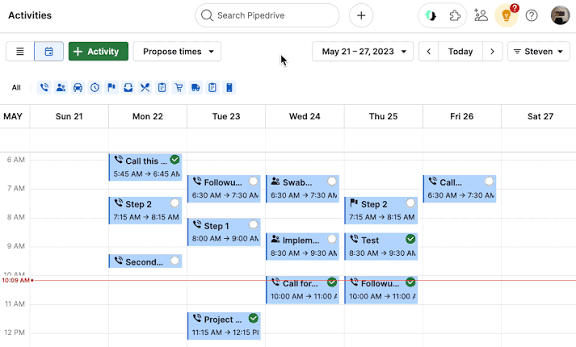
- Calls, meetings, tasks, notes, reminders, demos, and follow-up activity tracking
- Activity-based workflow that helps salespeople know what to do next
- Helpful for freelancers and small teams that sell through repeated human follow-up
Automation, reporting, and AI-assisted sales work
- Workflow automation, nurturing sequences, and email-related features depending on plan
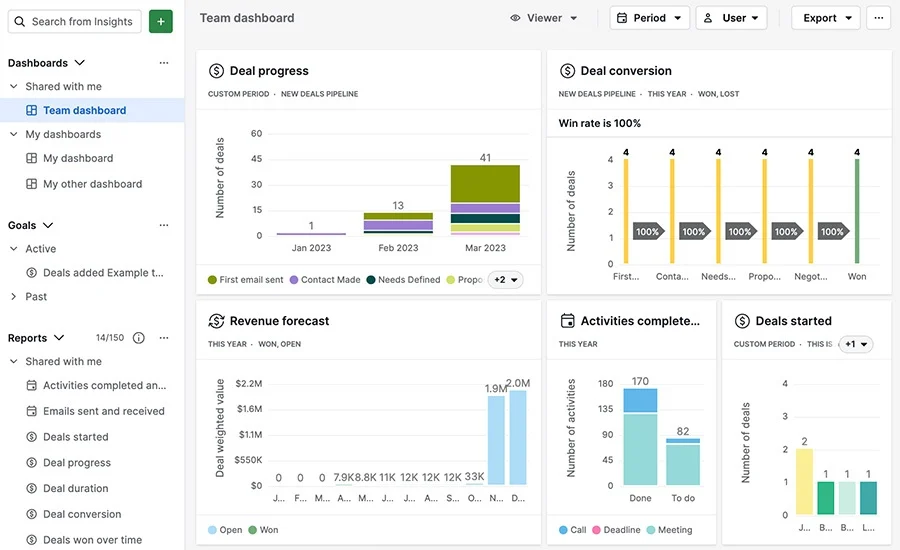
- Sales dashboards, reporting, forecasting, and pipeline visibility depending on plan
- AI-assisted reporting, email drafting, deal summaries, scoring, or data enrichment may be available depending on current plan details
- Useful when the main goal is improving sales process discipline rather than building a full marketing automation system
Integrations, add-ons, and stack building
- Marketplace with hundreds of integrations for sales, marketing, communication, documents, accounting, and automation workflows
- Optional or higher-tier tools may support lead capture, email marketing, web visitor tracking, projects, documents, and lead routing depending on current pricing
- Helpful when you want Pipedrive to be the sales CRM at the center of a larger lead generation stack
- Less ideal if you want one native platform to handle CRM, funnels, calendars, SMS, email, reputation, and client delivery without extra tools
Where Pipedrive Can Replace Separate Tools
Pipedrive can replace several lightweight sales tracking tools when your main workflow is managing leads and deals through a clear sales process. Its replacement value is strongest when you need one focused place for pipeline visibility, activity tracking, contact context, and sales follow-up.
Sales pipeline spreadsheet
Pipedrive can replace a spreadsheet or simple board used to track where each lead or deal sits in your sales process.
Contact and company notes
Pipedrive can store people, organizations, deal history, notes, activities, and related sales context in one CRM instead of scattered documents.
Deal and opportunity tracker
Pipedrive can help you track deal value, deal stage, owner, probability, expected close timing, and the next action needed to move the opportunity forward.
Follow-up reminder system
Pipedrive can keep tasks, calls, meetings, demos, and reminders attached to the right contact or deal so fewer opportunities go cold.
Basic sales reporting dashboard
Pipedrive can give small teams a clearer view of open deals, activity volume, pipeline movement, forecasting, bottlenecks, and sales performance trends depending on plan and setup.
Sales stack connector
Pipedrive can sit at the center of a sales stack through its marketplace and integrations, including email, calling, proposals, meetings, forms, automation, accounting, and prospecting tools.
This replacement value only matters if your main problem is sales pipeline management. If you need funnels, booking, SMS/email campaigns, reputation workflows, client sub-accounts, and local campaign delivery in one place, Pipedrive will likely need too many extra tools around it.
Pipedrive vs alternatives
- Choose Pipedrive if you mainly need a focused sales CRM for tracking leads, deals, activities, follow-up, and pipeline movement.
- Choose HighLevel if you need local lead generation workflows, funnels, calendars, SMS/email follow-up, client sub-accounts, reputation tools, and agency campaign management.
- GoHighLevel vs Pipedrive guide if you are comparing Pipedrive with a broader agency CRM. It explains when Pipedrive is better for simple sales pipeline tracking and when GoHighLevel is better for local lead generation, booking, SMS/email follow-up, and client workflows.
- Choose HubSpot if you want a broader CRM-first customer platform with sales, marketing, service, content, reporting, integrations, and long-term customer data management.
- Choose ActiveCampaign if your main priority is email marketing automation, segmentation, lead nurturing, and campaign workflows.
- Choose Apollo if your main problem is B2B prospecting, outbound list building, enrichment, and sales intelligence.
- Choose Jotform if you mainly need forms, intake flows, surveys, applications, or lead capture forms rather than a full CRM.
Pipedrive is strongest when you want a focused visual sales CRM. If your main need is agency campaign delivery, broader customer platform features, advanced email automation, outbound prospecting, or form-first lead capture, another tool may be a better fit.
| Alternative | Best for | Main tradeoff | Comparison |
|---|---|---|---|
| HighLevel | Agencies and local lead generation workflows | More complete for funnels, calendars, SMS/email follow-up, reputation, and client workflows, but usually more complex than Pipedrive as a simple sales CRM | View → |
| HubSpot | Broader CRM and customer platform needs | Broader across sales, marketing, service, content, and data, but can become more complex and expensive than Pipedrive for simple pipeline tracking | View → |
| ActiveCampaign | Email automation and lead nurturing | Stronger for email automation and segmentation, but less focused on simple visual deal pipeline management | — |
| Apollo | B2B prospecting and outbound sales intelligence | Stronger for finding prospects and building outbound lists, but not a visual sales pipeline CRM in the same way | — |
| Jotform | Forms, intake, and lead capture | Better for collecting lead information, but it does not replace a full sales CRM for pipeline and deal management | — |
| ClickFunnels / Systeme.io | Funnels and simple online sales flows | Better for landing pages and funnel-style conversion paths, but not as strong as Pipedrive for sales pipeline discipline | — |
Pipedrive FAQ
Is Pipedrive good for freelancers and consultants?
Yes, Pipedrive can be a good fit for freelancers and consultants who need a simple paid CRM to track leads, deals, activities, meetings, proposals, and follow-up. It is strongest when your workflow is mainly sales pipeline management.
Is Pipedrive good for local lead generation agencies?
Pipedrive can help track local lead opportunities and sales pipelines, but it is not mainly an agency funnel, calendar, SMS/email follow-up, reputation, or client sub-account platform. HighLevel may be a better fit for full local lead generation workflows.
Is Pipedrive easier than HubSpot?
Pipedrive is often easier if you mainly need visual sales pipeline tracking. HubSpot may be better if you want a broader CRM-first customer platform across sales, marketing, service, reporting, content, data, and integrations.
Does Pipedrive have a free plan?
Pipedrive currently promotes a 14-day free trial, but it should not be treated as a forever-free CRM. Check the official pricing page before buying because trial terms, plan names, and pricing can change.
Does Pipedrive include automation?
Yes, Pipedrive includes sales workflow automation features depending on plan and setup. It is best thought of as sales process automation, not a full replacement for a dedicated marketing automation platform.
Does Pipedrive replace HighLevel?
Usually not for agency-style local lead generation. Pipedrive can replace a simple sales CRM or pipeline spreadsheet, but HighLevel is more focused on funnels, calendars, SMS/email follow-up, client accounts, reputation workflows, and campaign delivery.
Is Pipedrive worth paying for?
Pipedrive may be worth paying for if your team will actually use the visual pipeline, deal tracking, activity reminders, reporting, forecasting, and follow-up structure. If you need a complete lead generation and client workflow platform, another tool may be a better fit.
Conclusion
Should you consider Pipedrive?
Lead Stack Score: 4.0 / 5. Pipedrive is worth considering if you mainly need a clean, sales-first CRM for tracking leads, deals, activities, reminders, forecasting, and follow-up through a visual pipeline. It is strongest as the sales CRM layer of a lead generation stack, not as the entire stack by itself.
Choose Pipedrive if
- You want a simple visual sales pipeline.
- You need deal tracking, contact records, activity reminders, reporting, and follow-up visibility.
- You are a freelancer, consultant, small agency, local service business, or small sales team selling through calls, meetings, demos, and proposals.
- You want a focused CRM without the broader complexity of a customer platform.
- You are comfortable using integrations or separate tools for lead capture, booking, campaigns, forms, and marketing workflows.
Choose another tool if
- You need agency-style client sub-accounts and local lead generation workflows.
- You mainly need funnels, landing pages, appointment booking, SMS/email follow-up, and reputation workflows.
- You want a broader customer platform for marketing, service, content, data, reporting, and operations.
- Your main priority is advanced email automation, segmentation, and nurture workflows.
- You need outbound prospecting data and sales intelligence more than pipeline tracking.
- You need a forever-free CRM plan instead of a paid CRM after the trial.
If Pipedrive matches your sales workflow, check the latest pricing, trial terms, plan limits, and add-ons on the official website. If you mainly need agency funnels, SMS/email follow-up, calendars, reputation workflows, and client campaign systems, read the HighLevel review before deciding.
Sources checked
This review uses public information from official Pipedrive pages, Pipedrive support and marketplace resources, editorial reviews, comparison articles, and verified user review platforms. Official Pipedrive sources are used for product and pricing facts. Third-party reviews are used to compare buyer sentiment, strengths, limitations, and positioning.